Before you resend a stuck dropshipping order, check whether the supplier already received it so you do not buy twice. These documented differences help you separate customer payment, supplier payment and shipment when choosing or using dropshipping automation.
Shopify can send the same order update again
Shopify's guidance for app builders says an app can receive the same notification more than once, such as when a connection times out. It tells app builders to recognize repeats and avoid doing the same work again.
Shopify also warns that updates can arrive out of order or be missed. It advises apps to check Shopify's data for changes they missed. That tells you why an app needs to check for repeats and missing updates. It does not prove a particular app will prevent duplicate supplier purchases.
In DSers' example, creating the order does not pay for it
The DSers first-order walkthrough starts with a connected Shopify store, an imported product and a paid customer order. After you choose shipping, Place Order creates an unpaid order on AliExpress. Make Payment then takes you to AliExpress to pay separately.
The supplier order already exists at that point, even though it is unpaid. This is the documented Shopify/AliExpress example, not a description of every DSers connection. The same guide says manually refreshing tracking checks for an update; it does not make the supplier ship faster.
AutoDS says to check the supplier before resending
The AutoDS Orders guide warns that, after you change a status manually, resending without checking whether the supplier order was placed can create a duplicate. It also warns against changing an order while it is actively processing.
Its Canceled label is for internal use. Changing that label does not cancel the actual supplier order. If the result is unclear, check the supplier order number and payment details before trying again. If you cannot confirm what happened, ask support to check rather than treating an error message as proof that nothing was purchased.
Zendrop shows customer payment and supplier payment separately
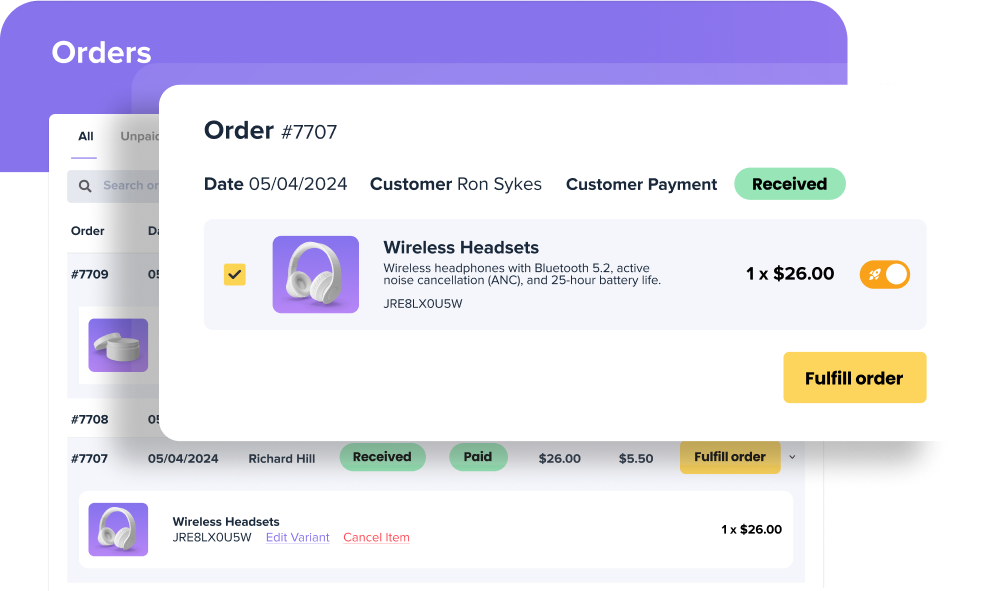
Zendrop's status guide defines Received in the Customer Order column as an order received by Zendrop for which your customer has paid your store. Paid in the Zendrop Payment column means Zendrop has charged your payment method.
In the Order Status column, Fulfill Order means the order has not been paid for on Zendrop. Processing means it has been paid and its suppliers are working on fulfillment. Customer payment does not establish payment to Zendrop. Processing does not establish delivery.
Ask what happens when work has to wait
Shopify limits how quickly apps can send certain requests. Its guidance tells app builders to space those requests out and handle errors. Those limits are not a budget for supplier purchases. Ask whether the order tool shows waiting or blocked orders and lets you require approval before it spends more.
Ask the software seller about an unclear order
- If an order shows an error, where can I check whether the supplier received it and whether I was charged?
- What does your app do if the same customer order arrives again, and can support check it without placing another purchase?
- If I cancel in your app, does that cancel the supplier order too, and where can I see the supplier's confirmation?
To examine the named ordering routes further, compare the documented AutoDS and DSers workflows. Before delegating supplier actions, collect the stock, dispatch and return evidence those actions depend on.
Sources and scope
Based on Shopify's webhook and API documentation, AutoDS Orders documentation, the DSers Shopify/AliExpress first-order walkthrough and Zendrop's order-status guide, checked October 1, 2026. We have not used the software or placed supplier orders.
- Shopify Developers: Verify webhook deliveries
- Shopify Developers: About webhooks
- DSers: Fulfill Your First Order: A Step-by-Step Walkthrough
- AutoDS: Orders page: settings, navigation, statuses, edit, filter, and troubleshoot
- Zendrop: What Each Order Status Means on Your Zendrop Dashboard
- Shopify Developers: Shopify API limits